
One interface for the infrastructure you already run
Pabawi is built for physical servers, virtual machines, long-lived operating systems, and mixed estates that do not fit into a single cloud or Kubernetes dashboard. It brings inventory and operations from Puppet, OpenVox, Bolt, Ansible, SSH, PuppetDB, Hiera, Proxmox, AWS, and Azure into a unified web interface.
It is self-hosted, licensed under Apache 2.0, and designed to work incrementally. Start with SSH inventory, connect PuppetDB for facts and reports, add Bolt or Ansible for execution, and enable provisioning integrations only where they are useful.
Multi-source inventory
Search nodes discovered from PuppetDB, Bolt, Ansible, SSH, Proxmox, AWS, and Azure while preserving useful groups and source context.
Puppet operations
Inspect reports, events, facts, catalogs, managed resources, environments, certificates, and Hiera data from a browser.
Controlled execution
Run approved commands, Bolt tasks, Ansible playbooks, package operations, and Puppet runs with streaming output and retained results.
Provisioning and lifecycle
Discover and manage Proxmox, AWS EC2, and Azure resources alongside the configuration-management systems that take over after creation.
RBAC and auditability
Use per-operation permissions, command whitelisting, JWT sessions, execution history, and node journals to make delegated operations visible.
Built-in MCP server
Expose read-only, RBAC-gated inventory, facts, reports, catalogs, Hiera, journals, and execution history to compatible AI clients.
Designed for mixed-tool teams
Most real environments are not clean-room deployments. A team may use Puppet for continuous configuration, Ansible for playbooks, SSH for legacy systems, and cloud or hypervisor APIs for provisioning. Pabawi does not require replacing those tools. It gives them a shared inventory, access layer, execution history, and operator interface.
This is useful for:
- Puppet and OpenVox teams that want a modern interface for PuppetDB, Hiera, reports, catalogs, and common operations.
- Infrastructure teams that use Puppet and Ansible together and want one place to find and act on nodes.
- Operators who should run approved actions without receiving unrestricted shell access.
- Homelabs and small teams that need a self-hosted SSH-based server interface.
- Virtualization and cloud teams connecting provisioning to configuration management.
- AI-assisted workflows that need bounded, read-only access to infrastructure facts and history.
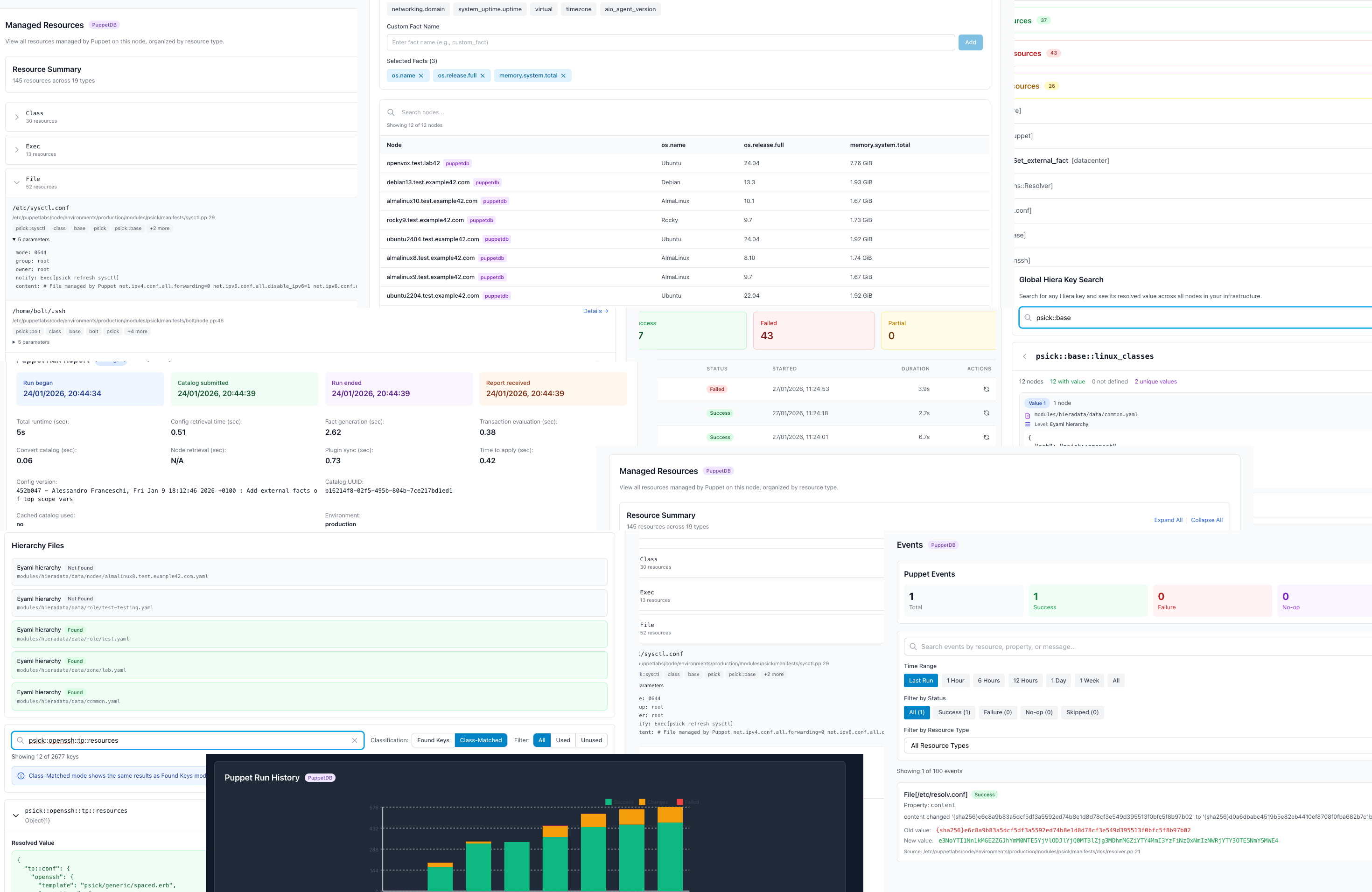
Puppet and OpenVox visibility without hiding the details
Pabawi uses PuppetDB and Puppet Server APIs rather than flattening Puppet into a generic server list. Operators can move from a node to its facts, reports, events, classes, catalog, and execution history. The Hiera browser can resolve keys in node context, and code analysis connects class usage with data and managed resources.
Expert mode preserves the underlying commands and diagnostic output. The UI is intended to shorten common workflows while keeping enough detail for experienced engineers to understand what is actually happening.
Security follows the operation
Authentication and role-based access control can restrict inventory, execution, provisioning, and administrative actions separately. Command whitelisting adds another boundary for ad-hoc execution. Destructive provisioning actions require both permission and an explicit server-side configuration switch.
Pabawi runs inside your environment. Infrastructure data, certificates, inventories, and execution output do not require a hosted control plane. As with any administrative interface, deploy it behind appropriate network controls, use dedicated credentials, and grant each integration only the permissions it needs.
Get started
The interactive setup detects available tools, creates the initial configuration, installs dependencies, and starts the application:
git clone https://github.com/example42/pabawi
cd pabawi
./scripts/setup.sh
Pabawi can also run as a container on amd64 or arm64. All integrations are optional; the documentation provides focused setup guides for PuppetDB, Puppet Server, Hiera, Bolt, Ansible, SSH, Proxmox, AWS, Azure, Docker, and Kubernetes.
The source, issue tracker, changelog, and releases are on GitHub. For project background, read the initial announcement and the version-one retrospective.
Need help evaluating or integrating Pabawi?
example42 can help with installation, Puppet and OpenVox integrations, deployment design, and custom development.
Discuss Pabawi View the source